

Using Miniconda in a commercial setting?
Using Miniconda in a commercial setting?
- You might need to purchase a license to stay compliant with our Terms of Service.
- If your company security policies do not allow admin privileges for end users, you will be unable to install Miniconda manually. Consider requesting that your IT admin add Miniconda to a software delivery or fleet management system (such as Kandji or Jamf).
Installation steps
- Navigate to anaconda.com/download.
- Scroll down and click Download Miniconda.
-
Select one of the following installers under Miniconda:
- Windows 64-bit (x86_64) Graphical Installer: For standard Windows PCs with Intel or AMD processors. Choose this if you are unsure which installer to use. Also known as
win-64. - Windows 64-bit (Arm64) Graphical Installer: For Windows PCs with Arm-based processors, such as devices with Qualcomm Snapdragon X chips or other Windows on Arm hardware. Also known as
win-arm64. For more information migrating your environments to Arm64, see Migrating from win-64 to win-arm64 architecture.
- Windows 64-bit (x86_64) Graphical Installer: For standard Windows PCs with Intel or AMD processors. Choose this if you are unsure which installer to use. Also known as
-
Go to your Downloads folder and double-click the installer to launch.
If you encounter issues during installation, temporarily disable your anti-virus software during install, then re-enable it after the installation concludes. If you installed for All Users, uninstall Miniconda and re-install it for Just Me only.
- Read through Miniconda’s End User License Agreement (EULA) and select I Agree to agree to the terms. You can view Anaconda’s Terms of Service (TOS) at https://www.anaconda.com/legal.
-
Select an installation option:
It is recommended to install Miniconda for the local user, which does not require administrator permissions and is the most robust type of installation. However, if you need to, you can install Miniconda system wide, which does require administrator permissions.
- Just Me (Recommended)
- Install Miniconda for the current user account.
- All Users
- Install Miniconda for all user accounts on the computer (requires Windows Administrator privileges).
- Select Next.
- Select a destination folder to install Miniconda, then select Next.
-
Customize your installation options:
- Create shortcuts
- Creates Start Menu shortcuts for the Anaconda Prompt packages. Deselecting this option skips creating these shortcuts.
- Add Miniconda3 to my PATH environment variable
- Adds the path that contains the conda binaries to your PATH environment variable.
- Register Miniconda3 as my default Python 3.13
- Selected by default. Registers the Python package in this install as the default Python for programs like VSCode, PyCharm, and so on.
- Clear the package cache upon completion
- Runs
conda clean --all --force-pkgs-dirsafter the install finishes. For more information on these commands, see the conda command documentation.
- Select Install. The installation might take a few minutes to complete. Select Show details to view the packages being installed.
- Select Next twice, then select Finish to close the installer.
Verify your install
Verify your installation was successful by opening , a command-line shell application that is included with conda installations for Windows. To open Anaconda Prompt, type “Anaconda Prompt” in the Windows search bar, then select the application.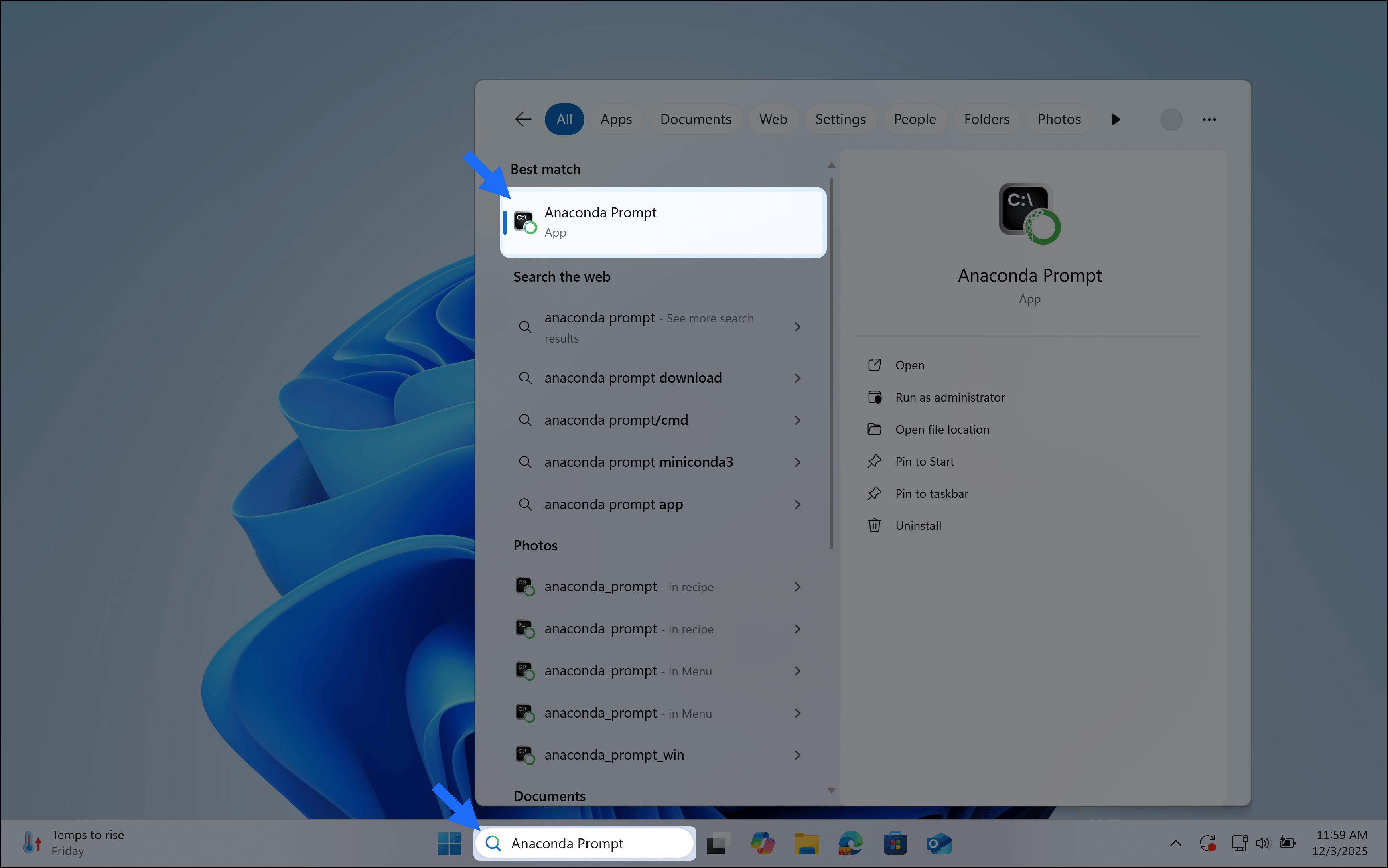
Choose how you want to work with conda
Anaconda Navigator provides a graphical user interface (GUI) to interface with , without using the command line. If you prefer working at the command line, you can interface with conda directly through (Windows) or your system’s terminal (macOS and Linux) after you complete your installation.Anaconda Navigator is not included with Miniconda. Follow the instructions on Installing Navigator to manually install Navigator onto your computer.
Get started with Navigator
Manage packages and environments with a desktop application
Work with conda
Use command-line tools for package and environment management