Anaconda Platform uses the outerbounds CLI to interact with your organization from a terminal. It enables you to download models from the model catalog, run flows on your organization’s compute, deploy and manage long-running services, and manage platform resources.
The outerbounds CLI is available as a conda package from the main channel and as a Python package from PyPI:
conda
uv
pip
conda install --name <ENVIRONMENT> outerbounds
uv pip install outerbounds
python -m pip install -U outerbounds
The model catalog commands (outerbounds mc) require outerbounds 0.12.45 or later. To upgrade an existing installation, run conda update outerbounds or pip install --upgrade outerbounds.
The open-source metaflow package conflicts with the Metaflow distribution bundled with the outerbounds CLI. If metaflow is already installed in your environment, uninstall it by running python -m pip uninstall metaflow, then reinstall outerbounds.
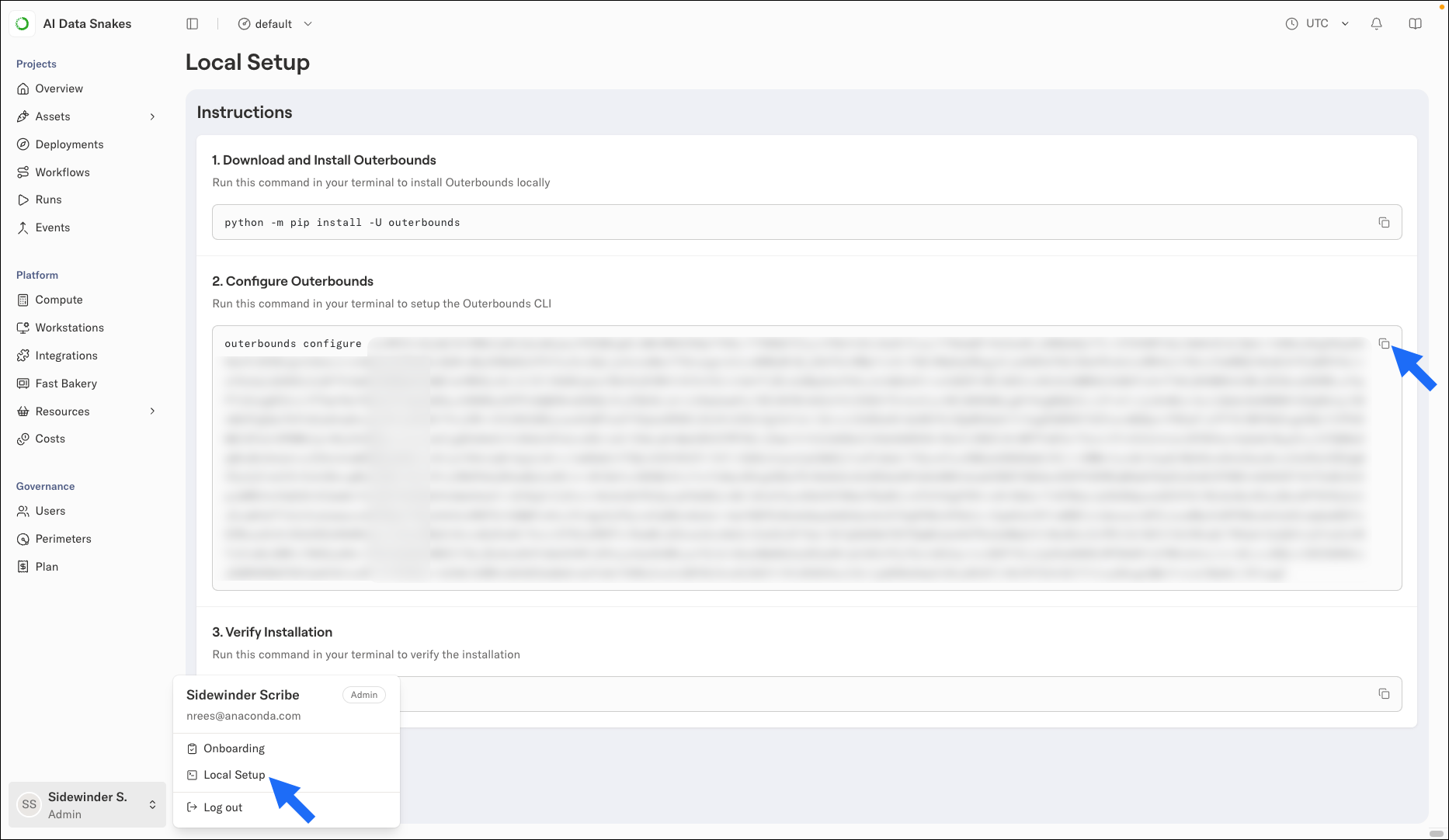
Open your user settings by clicking on your profile in the lower-left corner, then select Local Setup.
Under Configure Outerbounds, copy the command shown and run it in your terminal. The command includes your personal configuration string.
To verify your installation and configuration, run:
outerbounds check
If the check reports a problem, run outerbounds check --verbose for details.
The configure command decodes the string and writes a configuration file to ~/.metaflowconfig. You only need to configure the CLI once per machine for each organization you belong to. Most users only belong to one organization.The configuration string is specific to you and to the perimeter selected in the UI. If the Local Setup page does not show a configuration command, you might not have the required access to the perimeter. Contact your administrator.
To work with more than one organization, write each organization’s configuration to a named profile, then set the METAFLOW_PROFILE environment variable to select the profile the CLI uses:
Machine users are identities for automated pipelines and jobs, such as deploying a project from a CI/CD workflow. Unlike human users, machine users authenticate with a token issued by their identity provider rather than a configuration string from the UI.To configure the CLI for a machine user, run:
If your project contains an obproject.toml file, you can pass --from-obproject-toml instead of --name, --deployment-domain, and --perimeter. The CLI reads those values from the file. For more on project setup, see Working with projects.
The token flag depends on the machine user’s identity provider:The Use page for a machine user in the Anaconda Platform UI provides configuration commands and example CI/CD workflows, pre-filled for that machine user. To find it, select Users under Governance, open the Machines tab, and then select the machine user. For machine users backed by an AWS IAM role, the Use page provides an outerbounds configure command instead, which retrieves the configuration from AWS Secrets Manager and requires IAM credentials in the environment.For the full CI/CD setup, see Working with projects.
The outerbounds mc pull command downloads a model from the model catalog to your local machine or a workstation. For usage, options, and examples, see outerbounds mc pull.
The CLI creates deployments in your active perimeter. To change it, run outerbounds perimeter switch. For the full reference, including updating, inspecting, logs, and deletion, see the app commands.
The CLI includes command groups for working with platform resources. For the full reference, see the command overview.The outerbounds package also bundles Metaflow, the framework you use to develop and run flows:
{"docsConfig":{"theme":"mint","$schema":"https://mintlify.com/docs.json","name":"Anaconda","description":"Guides, tutorials, and reference material for Anaconda's Python, data science, and AI tools","colors":{"primary":"#1d6cf7","light":"#1d6cf7","dark":"#96f778"},"logo":{"light":"https://mintcdn.com/anaconda-29683c67/s-9WR15r5rZoaPqb/logo/light.svg?fit=max\u0026auto=format\u0026n=s-9WR15r5rZoaPqb\u0026q=85\u0026s=5996719b8530aaf065dc1ee1f39b2e67","dark":"https://mintcdn.com/anaconda-29683c67/s-9WR15r5rZoaPqb/logo/dark.svg?fit=max\u0026auto=format\u0026n=s-9WR15r5rZoaPqb\u0026q=85\u0026s=db482b1eac6af589d234160a76de3400","href":"https://www.anaconda.com/docs/main"},"favicon":"https://mintcdn.com/anaconda-29683c67/p8JNFuYYvTL8gfpM/favicon.png?fit=max\u0026auto=format\u0026n=p8JNFuYYvTL8gfpM\u0026q=85\u0026s=51a585758330bbe8f1ea032113854252","api":{"playground":{"display":"simple"}},"background":{"color":{"light":"#f4f5f8","dark":"#10121a"}},"navbar":{},"footer":{"socials":{"linkedin":"https://www.linkedin.com/company/anacondainc","github":"https://github.com/ContinuumIO","youtube":"https://www.youtube.com/c/ContinuumIo"},"links":[{"header":"Company","items":[{"label":"Anaconda Newsletter","href":"https://www.anaconda.com/newsletter"}]}]},"seo":{"metatags":{"canonical":"https://www.anaconda.com/docs"}},"styling":{"eyebrows":"breadcrumbs","latex":false},"integrations":{"ga4":{"measurementId":"G-VQTY6YKM6J"},"heap":{"appId":"758475466"}},"contextual":{"options":["claude","chatgpt","perplexity","cursor","vscode","add-mcp","copy"],"display":"header"},"navigation":{"pages":[]}},"deployment":{"deploymentMetadataValue":{"subdomain":"anaconda-29683c67","hasAudioNarration":false,"actualSubdomain":"anaconda-29683c67","customDomains":["anaconda.com"],"gitSource":{"type":"github","owner":"anaconda","repo":"documentation","deployBranch":"main","contentDirectory":"","isPrivate":true,"mountPath":"","label":""},"chroma":{"liveDeploymentHistoryId":"6aeccf8cc661c93862c28185","collectionId":"0c9f481a-ca94-4694-9a0b-b0e294c2661a","schemaVersion":"v3","latestBuiltDeploymentHistoryId":"6aeccf8cc661c93862c28185"},"feedback":{"thumbs":true,"contextualFeedback":{"allowEmail":true,"emailDisclaimer":"Your email will only be used to follow up on this feedback."}},"entitlements":{"AI_CHAT":{"status":"ENABLED"},"REMOVE_BRANDING":{"status":"ENABLED"},"CONTEXTUAL_FEEDBACK":{"status":"ENABLED"},"CODE_SNIPPET_FEEDBACK":{"status":"ENABLED"},"WEB_MCP":{"status":"ENABLED"},"NARRATION":{"status":"ENABLED"}},"buildId":"6aee4d21425b90b39aa20edc","clientVersion":"0.0.4076","searchFilterCounts":[{"language":"default","tag":"Data Science \u0026 AI Workbench","count":240},{"language":"default","tag":"Anaconda Platform","count":151},{"language":"default","tag":"Package Security Manager","count":128},{"language":"default","tag":"Anaconda CLI","count":112},{"language":"default","tag":"Guides","count":105},{"language":"default","tag":"Anaconda CLI \u0026 MCP","count":104},{"language":"default","tag":"Plugins","count":93},{"language":"default","tag":"Commands","count":91},{"language":"default","tag":"Anaconda Desktop","count":86},{"language":"default","tag":"Platform Guides","count":86}],"searchSettings":{"isFiltersEnabled":true}},"assistantConfig":{"enableAskAiButton":false,"enableStarterQuestions":true,"enableContextualStarterQuestions":true,"deflection":{"enabled":true,"email":"support@anaconda.com"}},"basePath":"/docs","hasChatPermissions":true,"hasWebMcpPermissions":true,"toggles":[{"name":"kill-isr","enabled":true,"variant":{"name":"disabled","enabled":false,"feature_enabled":true},"impressionData":false},{"name":"agent-mintlify-slack","enabled":true,"variant":{"name":"disabled","enabled":false,"feature_enabled":true},"impressionData":false},{"name":"agent-integrations-settings","enabled":true,"variant":{"name":"disabled","enabled":false,"feature_enabled":true},"impressionData":false},{"name":"rbac-expansion","enabled":true,"variant":{"name":"disabled","enabled":false,"feature_enabled":true},"impressionData":false},{"name":"automations-pr-grouping","enabled":true,"variant":{"name":"disabled","enabled":false,"feature_enabled":true},"impressionData":false},{"name":"custom-prefix","enabled":true,"variant":{"name":"disabled","enabled":false,"feature_enabled":true},"impressionData":false},{"name":"analytics-v7","enabled":true,"variant":{"name":"disabled","enabled":false,"feature_enabled":true},"impressionData":false},{"name":"user-flows-analytics","enabled":true,"variant":{"name":"disabled","enabled":false,"feature_enabled":true},"impressionData":false},{"name":"no-publish-flow","enabled":true,"variant":{"name":"disabled","enabled":false,"feature_enabled":true},"impressionData":false},{"name":"workos-onboarding","enabled":true,"variant":{"name":"disabled","enabled":false,"feature_enabled":true},"impressionData":false},{"name":"llms-txt-v2","enabled":true,"variant":{"name":"disabled","enabled":false,"feature_enabled":true},"impressionData":false},{"name":"snapshot-serving-live","enabled":true,"variant":{"name":"disabled","enabled":false,"feature_enabled":true},"impressionData":false},{"name":"stripTemperatureMiddleware","enabled":true,"variant":{"name":"disabled","enabled":false,"feature_enabled":true},"impressionData":false},{"name":"support-platform-pylon-zendesk","enabled":true,"variant":{"name":"disabled","enabled":false,"feature_enabled":true},"impressionData":false},{"name":"snapshot-serving","enabled":true,"variant":{"name":"disabled","enabled":false,"feature_enabled":true},"impressionData":false},{"name":"instant-rollback","enabled":true,"variant":{"name":"disabled","enabled":false,"feature_enabled":true},"impressionData":false},{"name":"granular-notifications-server","enabled":true,"variant":{"name":"disabled","enabled":false,"feature_enabled":true},"impressionData":false},{"name":"granular-notifications","enabled":true,"variant":{"name":"disabled","enabled":false,"feature_enabled":true},"impressionData":false},{"name":"automations-fable","enabled":true,"variant":{"name":"disabled","enabled":false,"feature_enabled":true},"impressionData":false},{"name":"fixed-ai-action-pricing","enabled":true,"variant":{"name":"disabled","enabled":false,"feature_enabled":true},"impressionData":false},{"name":"automation-resolve-merge-conflict","enabled":true,"variant":{"name":"disabled","enabled":false,"feature_enabled":true},"impressionData":false},{"name":"scoped-publishing","enabled":true,"variant":{"name":"disabled","enabled":false,"feature_enabled":true},"impressionData":false},{"name":"mintql","enabled":true,"variant":{"name":"disabled","enabled":false,"feature_enabled":true},"impressionData":false},{"name":"page-level-analytics","enabled":true,"variant":{"name":"disabled","enabled":false,"feature_enabled":true},"impressionData":false},{"name":"editor-version-history-v2","enabled":true,"variant":{"name":"disabled","enabled":false,"feature_enabled":true},"impressionData":false},{"name":"billing-page-v2","enabled":true,"variant":{"name":"disabled","enabled":false,"feature_enabled":true},"impressionData":false},{"name":"full-page-search","enabled":true,"variant":{"name":"disabled","enabled":false,"feature_enabled":true},"impressionData":false},{"name":"workspace-projects","enabled":true,"variant":{"name":"disabled","enabled":false,"feature_enabled":true},"impressionData":false},{"name":"assistant-v5","enabled":true,"variant":{"name":"disabled","enabled":false,"feature_enabled":true},"impressionData":false},{"name":"fork-pr-previews","enabled":true,"variant":{"name":"disabled","enabled":false,"feature_enabled":true},"impressionData":false},{"name":"revalidation-jwt","enabled":true,"variant":{"name":"disabled","enabled":false,"feature_enabled":true},"impressionData":false},{"name":"workos-sso-scim","enabled":true,"variant":{"name":"disabled","enabled":false,"feature_enabled":true},"impressionData":false},{"name":"hobby-abuse-scan","enabled":true,"variant":{"name":"disabled","enabled":false,"feature_enabled":true},"impressionData":false},{"name":"dashboard-inbox","enabled":true,"variant":{"name":"disabled","enabled":false,"feature_enabled":true},"impressionData":false},{"name":"workos-signup","enabled":true,"variant":{"name":"disabled","enabled":false,"feature_enabled":true},"impressionData":false},{"name":"turbopuffer-dual-write","enabled":true,"variant":{"name":"disabled","enabled":false,"feature_enabled":true},"impressionData":false},{"name":"workos-enabled","enabled":true,"variant":{"name":"disabled","enabled":false,"feature_enabled":true},"impressionData":false},{"name":"approve-review-flow","enabled":true,"variant":{"name":"disabled","enabled":false,"feature_enabled":true},"impressionData":false},{"name":"sso-setup-deadline-banner","enabled":true,"variant":{"name":"disabled","enabled":false,"feature_enabled":true},"impressionData":false},{"name":"turbopuffer-serve","enabled":true,"variant":{"name":"disabled","enabled":false,"feature_enabled":true},"impressionData":false},{"name":"live-agents","enabled":true,"variant":{"name":"disabled","enabled":false,"feature_enabled":true},"impressionData":false},{"name":"comment-mode","enabled":true,"variant":{"name":"disabled","enabled":false,"feature_enabled":true},"impressionData":false}],"googleFontsInlined":false},"customCss":[{"filePath":"custom.css","href":"/docs/_mintlify/custom/anaconda-29683c67/d510a3fe27570495/custom.css"}],"page":{"pagePath":"platform/cli","slug":"/platform/cli","pageMetadata":{"title":"Getting started with the platform CLI","sidebarTitle":"Getting started with the CLI","searchDescription":"Install and configure the outerbounds CLI for Anaconda Platform, authenticate to your organization, download models from the model catalog, and manage deployments.","keywords":["platform","cli","outerbounds","install","configure","authentication","model","catalog","download","deployment","organization"],"description":null,"href":"/platform/cli"},"pageType":"default","mdx":{"mdxSource":{"compiledSource":"\"use strict\";const{Fragment:_Fragment,jsx:_jsx,jsxs:_jsxs}=arguments[0];const{useMDXComponents:_provideComponents}=arguments[0];const GCell=({children,className})=>_jsx(`div`,{className:`grid-table-cell ${className||``}`,role:`cell`,children});const GTH=({children,className})=>_jsx(`div`,{className:`grid-table-th ${className||``}`,role:`columnheader`,children});const GRow=({children})=>_jsx(`div`,{className:`grid-table-row`,role:`row`,children});const GBody=({children})=>_jsx(`div`,{className:`grid-table-body`,role:`rowgroup`,children});const GHead=({children})=>_jsx(`div`,{className:`grid-table-head`,role:`rowgroup`,children});const GTable=({children,className,cols})=>_jsx(`div`,{className:`grid-table not-prose mint-overflow-hidden mint-rounded-2xl ${className||``}`,style:{\"--grid-table-cols\":cols},role:`table`,children});const Comments=({children})=>{return _jsxs(`div`,{class:`mint-my-4 mint-px-5 mint-py-4 mint-overflow-hidden mint-rounded-2xl mint-flex mint-gap-3 mint-border mint-border-zinc-500/20 mint-bg-zinc-50/50 dark:mint-border-zinc-500/30 dark:mint-bg-zinc-500/10`,\"data-callout-type\":`comments`,children:[_jsx(`div`,{class:`mint-w-4`,children:_jsx(`svg`,{width:`14`,height:`14`,viewBox:`0 0 640 640`,fill:`currentColor`,xmlns:`http://www.w3.org/2000/svg`,class:`mint-w-5 mint-h-5`,\"aria-label\":`Comments`,children:_jsx(`path`,{d:`M320 112C434.9 112 528 205.1 528 320C528 434.9 434.9 528 320 528C205.1 528 112 434.9 112 320C112 205.1 205.1 112 320 112zM320 576C461.4 576 576 461.4 576 320C576 178.6 461.4 64 320 64C178.6 64 64 178.6 64 320C64 461.4 178.6 576 320 576zM280 400C266.7 400 256 410.7 256 424C256 437.3 266.7 448 280 448L360 448C373.3 448 384 437.3 384 424C384 410.7 373.3 400 360 400L352 400L352 312C352 298.7 341.3 288 328 288L280 288C266.7 288 256 298.7 256 312C256 325.3 266.7 336 280 336L304 336L304 400L280 400zM320 256C337.7 256 352 241.7 352 224C352 206.3 337.7 192 320 192C302.3 192 288 206.3 288 224C288 241.7 302.3 256 320 256z`})})}),_jsx(`div`,{class:`mint-text-sm prose mint-min-w-0 mint-w-full`,children})]})};function _createMdxContent(props){const _components={a:`a`,code:`code`,li:`li`,ol:`ol`,p:`p`,pre:`pre`,span:`span`,strong:`strong`,..._provideComponents(),...props.components},{CodeBlock,Frame,Heading,Icon,OptimizedImage,Tab,Tabs,Tip,Warning,_MdxComponentBoundary}=_components;if(!CodeBlock)_missingMdxReference(`CodeBlock`,true);if(!Frame)_missingMdxReference(`Frame`,true);if(!Heading)_missingMdxReference(`Heading`,true);if(!Icon)_missingMdxReference(`Icon`,true);if(!OptimizedImage)_missingMdxReference(`OptimizedImage`,true);if(!Tab)_missingMdxReference(`Tab`,true);if(!Tabs)_missingMdxReference(`Tabs`,true);if(!Tip)_missingMdxReference(`Tip`,true);if(!Warning)_missingMdxReference(`Warning`,true);if(!_MdxComponentBoundary)_missingMdxReference(`_MdxComponentBoundary`,true);return _jsxs(_Fragment,{children:[_jsxs(_components.p,{children:[`Anaconda Platform uses the `,_jsx(_components.code,{children:`outerbounds`}),` CLI to interact with your organization from a terminal. It enables you to download models from the `,_jsx(_components.a,{href:`/platform/concepts/what-is-the-model-catalog`,children:`model catalog`}),`, run flows on your organization’s compute, deploy and manage long-running services, and manage platform resources.`]}),`\n`,_jsx(Heading,{level:`2`,id:`installing-the-cli`,children:`Installing the CLI`}),`\n`,_jsxs(_components.p,{children:[`The `,_jsx(_components.code,{children:`outerbounds`}),` CLI is available as a conda package from the `,_jsx(_components.code,{children:`main`}),` channel and as a Python package from PyPI:`]}),`\n`,_jsxs(Tabs,{children:[_jsxs(Tab,{title:`conda`,id:`conda`,children:[_jsx(CodeBlock,{filename:``,numberOfLines:`1`,language:`shellscript`,children:_jsx(_components.pre,{className:`shiki shiki-themes github-light-default dark-plus`,style:{backgroundColor:`#ffffff`,\"--shiki-dark-bg\":`#0B0C0E`,color:`#1f2328`,\"--shiki-dark\":`#D4D4D4`},language:`shellscript`,children:_jsxs(_components.code,{language:`shellscript`,numberOfLines:`1`,children:[_jsxs(_components.span,{className:`line`,children:[_jsx(_components.span,{style:{color:`#953800`,\"--shiki-dark\":`#DCDCAA`},children:`conda`}),_jsx(_components.span,{style:{color:`#0A3069`,\"--shiki-dark\":`#CE9178`},children:` install`}),_jsx(_components.span,{style:{color:`#0550AE`,\"--shiki-dark\":`#569CD6`},children:` --name`}),_jsx(_components.span,{style:{color:`#CF222E`,\"--shiki-dark\":`#D4D4D4`},children:` \u003c`}),_jsx(_components.span,{style:{color:`#0A3069`,\"--shiki-dark\":`#CE9178`},children:`ENVIRONMEN`}),_jsx(_components.span,{style:{color:`#0A3069`,\"--shiki-dark\":`#CE9178`},children:`T`}),_jsx(_components.span,{style:{color:`#CF222E`,\"--shiki-dark\":`#D4D4D4`},children:`>`}),_jsx(_components.span,{style:{color:`#0A3069`,\"--shiki-dark\":`#CE9178`},children:` outerbounds`})]}),`\n`]})})}),_jsx(_MdxComponentBoundary,{name:`Comments`,children:_jsx(Comments,{children:_jsx(_components.p,{children:`Replace \u003cENVIRONMENT> with the name of the environment where you want to install the CLI.`})})})]}),_jsx(Tab,{title:`uv`,id:`uv`,children:_jsx(CodeBlock,{filename:``,numberOfLines:`1`,language:`shellscript`,children:_jsx(_components.pre,{className:`shiki shiki-themes github-light-default dark-plus`,style:{backgroundColor:`#ffffff`,\"--shiki-dark-bg\":`#0B0C0E`,color:`#1f2328`,\"--shiki-dark\":`#D4D4D4`},language:`shellscript`,children:_jsxs(_components.code,{language:`shellscript`,numberOfLines:`1`,children:[_jsxs(_components.span,{className:`line`,children:[_jsx(_components.span,{style:{color:`#953800`,\"--shiki-dark\":`#DCDCAA`},children:`uv`}),_jsx(_components.span,{style:{color:`#0A3069`,\"--shiki-dark\":`#CE9178`},children:` pip`}),_jsx(_components.span,{style:{color:`#0A3069`,\"--shiki-dark\":`#CE9178`},children:` install`}),_jsx(_components.span,{style:{color:`#0A3069`,\"--shiki-dark\":`#CE9178`},children:` outerbounds`})]}),`\n`]})})})}),_jsx(Tab,{title:`pip`,id:`pip`,children:_jsx(CodeBlock,{filename:``,numberOfLines:`1`,language:`shellscript`,children:_jsx(_components.pre,{className:`shiki shiki-themes github-light-default dark-plus`,style:{backgroundColor:`#ffffff`,\"--shiki-dark-bg\":`#0B0C0E`,color:`#1f2328`,\"--shiki-dark\":`#D4D4D4`},language:`shellscript`,children:_jsxs(_components.code,{language:`shellscript`,numberOfLines:`1`,children:[_jsxs(_components.span,{className:`line`,children:[_jsx(_components.span,{style:{color:`#953800`,\"--shiki-dark\":`#DCDCAA`},children:`python`}),_jsx(_components.span,{style:{color:`#0550AE`,\"--shiki-dark\":`#569CD6`},children:` -m`}),_jsx(_components.span,{style:{color:`#0A3069`,\"--shiki-dark\":`#CE9178`},children:` pip`}),_jsx(_components.span,{style:{color:`#0A3069`,\"--shiki-dark\":`#CE9178`},children:` install`}),_jsx(_components.span,{style:{color:`#0550AE`,\"--shiki-dark\":`#569CD6`},children:` -U`}),_jsx(_components.span,{style:{color:`#0A3069`,\"--shiki-dark\":`#CE9178`},children:` outerbounds`})]}),`\n`]})})})})]}),`\n`,_jsxs(_components.p,{children:[`The model catalog commands (`,_jsx(_components.code,{children:`outerbounds mc`}),`) require `,_jsx(_components.code,{children:`outerbounds`}),` 0.12.45 or later. To upgrade an existing installation, run `,_jsx(_components.code,{children:`conda update outerbounds`}),` or `,_jsx(_components.code,{children:`pip install --upgrade outerbounds`}),`.`]}),`\n`,_jsx(Warning,{children:_jsxs(_components.p,{children:[`The open-source `,_jsx(_components.code,{children:`metaflow`}),` package conflicts with the Metaflow distribution bundled with the `,_jsx(_components.code,{children:`outerbounds`}),` CLI. If `,_jsx(_components.code,{children:`metaflow`}),` is already installed in your environment, uninstall it by running `,_jsx(_components.code,{children:`python -m pip uninstall metaflow`}),`, then reinstall `,_jsx(_components.code,{children:`outerbounds`}),`.`]})}),`\n`,_jsx(Heading,{level:`2`,id:`authenticating-to-your-anaconda-platform-organization`,children:`Authenticating to your Anaconda Platform organization`}),`\n`,_jsxs(_components.p,{children:[`Your organization generates a personal configuration string for you, displayed in the Anaconda Platform UI as a ready-to-run `,_jsx(_components.code,{children:`configure`}),` command.`]}),`\n`,_jsx(Tip,{children:_jsxs(_components.p,{children:[`On a `,_jsx(_components.a,{href:`/platform/concepts/what-is-a-workstation`,children:`workstation`}),`, the CLI is already installed and configured for you. If you’re working in a workstation, skip ahead to `,_jsx(_components.a,{href:`#downloading-models-from-the-catalog`,children:`Downloading models from the catalog`}),`.`]})}),`\n`,_jsx(_components.p,{children:`To authenticate the CLI:`}),`\n`,_jsxs(_components.ol,{children:[`\n`,_jsxs(_components.li,{children:[`\n`,_jsx(_components.p,{children:`Log in to your Anaconda Platform organization.`}),`\n`]}),`\n`,_jsxs(_components.li,{children:[`\n`,_jsxs(_components.p,{children:[`Open your user settings by clicking on your profile in the lower-left corner, then select `,_jsx(_components.strong,{children:`Local Setup`}),`.`]}),`\n`]}),`\n`,_jsxs(_components.li,{children:[`\n`,_jsxs(_components.p,{children:[`Under `,_jsx(_components.strong,{children:`Configure Outerbounds`}),`, copy the command shown and run it in your terminal. The command includes your personal configuration string.`]}),`\n`,_jsx(Frame,{children:_jsx(OptimizedImage,{src:`https://mintcdn.com/anaconda-29683c67/VD0yQ0tXYWIdTsBU/images/platform/plat_local_setup.png?fit=max\u0026auto=format\u0026n=VD0yQ0tXYWIdTsBU\u0026q=85\u0026s=bf28f2f48912aaf2df4c4c252fa2ceba`,alt:`The Local Setup page showing the Configure Outerbounds section with a ready-to-copy configure command`,\"data-og-width\":`1866`,width:`1866`,\"data-og-height\":`1082`,height:`1082`,\"data-path\":`images/platform/plat_local_setup.png`,\"data-optimize\":`true`,\"data-opv\":`3`,srcset:`https://mintcdn.com/anaconda-29683c67/VD0yQ0tXYWIdTsBU/images/platform/plat_local_setup.png?w=280\u0026fit=max\u0026auto=format\u0026n=VD0yQ0tXYWIdTsBU\u0026q=85\u0026s=5cfd0c2691082cde506092e815054fb4 280w, https://mintcdn.com/anaconda-29683c67/VD0yQ0tXYWIdTsBU/images/platform/plat_local_setup.png?w=560\u0026fit=max\u0026auto=format\u0026n=VD0yQ0tXYWIdTsBU\u0026q=85\u0026s=1c5a0552af7fbed628d8942588118837 560w, https://mintcdn.com/anaconda-29683c67/VD0yQ0tXYWIdTsBU/images/platform/plat_local_setup.png?w=840\u0026fit=max\u0026auto=format\u0026n=VD0yQ0tXYWIdTsBU\u0026q=85\u0026s=01caf3e47192b7322f44df77e5f7b62b 840w, https://mintcdn.com/anaconda-29683c67/VD0yQ0tXYWIdTsBU/images/platform/plat_local_setup.png?w=1100\u0026fit=max\u0026auto=format\u0026n=VD0yQ0tXYWIdTsBU\u0026q=85\u0026s=e973f3bf322b5a33940ca7c11f1d9074 1100w, https://mintcdn.com/anaconda-29683c67/VD0yQ0tXYWIdTsBU/images/platform/plat_local_setup.png?w=1650\u0026fit=max\u0026auto=format\u0026n=VD0yQ0tXYWIdTsBU\u0026q=85\u0026s=9e0f7dbe773064925cc0b6c509db7d20 1650w, https://mintcdn.com/anaconda-29683c67/VD0yQ0tXYWIdTsBU/images/platform/plat_local_setup.png?w=2500\u0026fit=max\u0026auto=format\u0026n=VD0yQ0tXYWIdTsBU\u0026q=85\u0026s=94968a4732b3bfd5bbb04fb886efd503 2500w`})}),`\n`]}),`\n`,_jsxs(_components.li,{children:[`\n`,_jsx(_components.p,{children:`To verify your installation and configuration, run:`}),`\n`,_jsx(CodeBlock,{filename:``,numberOfLines:`1`,language:`shellscript`,children:_jsx(_components.pre,{className:`shiki shiki-themes github-light-default dark-plus`,style:{backgroundColor:`#ffffff`,\"--shiki-dark-bg\":`#0B0C0E`,color:`#1f2328`,\"--shiki-dark\":`#D4D4D4`},language:`shellscript`,children:_jsxs(_components.code,{language:`shellscript`,numberOfLines:`1`,children:[_jsxs(_components.span,{className:`line`,children:[_jsx(_components.span,{style:{color:`#953800`,\"--shiki-dark\":`#DCDCAA`},children:`outerbounds`}),_jsx(_components.span,{style:{color:`#0A3069`,\"--shiki-dark\":`#CE9178`},children:` check`})]}),`\n`]})})}),`\n`,_jsxs(_components.p,{children:[`If the check reports a problem, run `,_jsx(_components.code,{children:`outerbounds check --verbose`}),` for details.`]}),`\n`]}),`\n`]}),`\n`,_jsxs(_components.p,{children:[`The `,_jsx(_components.code,{children:`configure`}),` command decodes the string and writes a configuration file to `,_jsx(_components.code,{children:`~/.metaflowconfig`}),`. You only need to configure the CLI once per machine for each organization you belong to. Most users only belong to one organization.`]}),`\n`,_jsxs(_components.p,{children:[`The configuration string is specific to you and to the perimeter selected in the UI. If the `,_jsx(_components.strong,{children:`Local Setup`}),` page does not show a configuration command, you might not have the required access to the perimeter. Contact your administrator.`]}),`\n`,_jsx(Heading,{level:`3`,id:`configure-options`,children:`Configure options`}),`\n`,_jsx(_MdxComponentBoundary,{name:`GTable`,children:_jsxs(GTable,{cols:`25% 25% 50%`,children:[_jsx(_MdxComponentBoundary,{name:`GHead`,children:_jsx(GHead,{children:_jsx(_MdxComponentBoundary,{name:`GRow`,children:_jsxs(GRow,{children:[_jsx(_MdxComponentBoundary,{name:`GTH`,children:_jsx(GTH,{children:`Option`})}),_jsx(_MdxComponentBoundary,{name:`GTH`,children:_jsx(GTH,{children:`Default`})}),_jsx(_MdxComponentBoundary,{name:`GTH`,children:_jsx(GTH,{children:`Description`})})]})})})}),_jsx(_MdxComponentBoundary,{name:`GBody`,children:_jsxs(GBody,{children:[_jsx(_MdxComponentBoundary,{name:`GRow`,children:_jsxs(GRow,{children:[_jsx(_MdxComponentBoundary,{name:`GCell`,children:_jsx(GCell,{children:_jsx(_components.code,{children:`-d, --config-dir \u003cPATH>`})})}),_jsx(_MdxComponentBoundary,{name:`GCell`,children:_jsx(GCell,{children:_jsx(_components.code,{children:`~/.metaflowconfig`})})}),_jsx(_MdxComponentBoundary,{name:`GCell`,children:_jsx(GCell,{children:`Path to the Metaflow configuration directory`})})]})}),_jsx(_MdxComponentBoundary,{name:`GRow`,children:_jsxs(GRow,{children:[_jsx(_MdxComponentBoundary,{name:`GCell`,children:_jsx(GCell,{children:_jsx(_components.code,{children:`-p, --profile \u003cPROFILE>`})})}),_jsx(_MdxComponentBoundary,{name:`GCell`,children:_jsx(GCell,{})}),_jsx(_MdxComponentBoundary,{name:`GCell`,children:_jsxs(GCell,{children:[`Save the configuration as a named profile instead of the default. Use the `,_jsx(_components.code,{children:`METAFLOW_PROFILE`}),` environment variable to switch between profiles. See `,_jsx(_components.a,{href:`#working-with-multiple-organizations`,children:`Working with multiple organizations`}),`.`]})})]})}),_jsx(_MdxComponentBoundary,{name:`GRow`,children:_jsxs(GRow,{children:[_jsx(_MdxComponentBoundary,{name:`GCell`,children:_jsx(GCell,{children:_jsx(_components.code,{children:`-e, --echo`})})}),_jsx(_MdxComponentBoundary,{name:`GCell`,children:_jsx(GCell,{children:_jsx(_components.code,{children:`false`})})}),_jsx(_MdxComponentBoundary,{name:`GCell`,children:_jsx(GCell,{children:`Print the configuration values to stdout`})})]})}),_jsx(_MdxComponentBoundary,{name:`GRow`,children:_jsxs(GRow,{children:[_jsx(_MdxComponentBoundary,{name:`GCell`,children:_jsx(GCell,{children:_jsx(_components.code,{children:`-f, --force`})})}),_jsx(_MdxComponentBoundary,{name:`GCell`,children:_jsx(GCell,{children:_jsx(_components.code,{children:`false`})})}),_jsx(_MdxComponentBoundary,{name:`GCell`,children:_jsx(GCell,{children:`Overwrite an existing configuration without prompting`})})]})})]})})]})}),`\n`,_jsx(Heading,{level:`3`,id:`working-with-multiple-organizations`,children:`Working with multiple organizations`}),`\n`,_jsxs(_components.p,{children:[`To work with more than one organization, write each organization’s configuration to a named profile, then set the `,_jsx(_components.code,{children:`METAFLOW_PROFILE`}),` environment variable to select the profile the CLI uses:`]}),`\n`,_jsx(CodeBlock,{filename:``,numberOfLines:`2`,language:`shellscript`,children:_jsx(_components.pre,{className:`shiki shiki-themes github-light-default dark-plus`,style:{backgroundColor:`#ffffff`,\"--shiki-dark-bg\":`#0B0C0E`,color:`#1f2328`,\"--shiki-dark\":`#D4D4D4`},language:`shellscript`,children:_jsxs(_components.code,{language:`shellscript`,numberOfLines:`2`,children:[_jsxs(_components.span,{className:`line`,children:[_jsx(_components.span,{style:{color:`#953800`,\"--shiki-dark\":`#DCDCAA`},children:`outerbounds`}),_jsx(_components.span,{style:{color:`#0A3069`,\"--shiki-dark\":`#CE9178`},children:` configure`}),_jsx(_components.span,{style:{color:`#0550AE`,\"--shiki-dark\":`#569CD6`},children:` --profile`}),_jsx(_components.span,{style:{color:`#CF222E`,\"--shiki-dark\":`#D4D4D4`},children:` \u003c`}),_jsx(_components.span,{style:{color:`#0A3069`,\"--shiki-dark\":`#CE9178`},children:`PROFILE_NAM`}),_jsx(_components.span,{style:{color:`#0A3069`,\"--shiki-dark\":`#CE9178`},children:`E`}),_jsx(_components.span,{style:{color:`#CF222E`,\"--shiki-dark\":`#D4D4D4`},children:`>`}),_jsx(_components.span,{style:{color:`#CF222E`,\"--shiki-dark\":`#D4D4D4`},children:` \u003c`}),_jsx(_components.span,{style:{color:`#0A3069`,\"--shiki-dark\":`#CE9178`},children:`TOKE`}),_jsx(_components.span,{style:{color:`#0A3069`,\"--shiki-dark\":`#CE9178`},children:`N`}),_jsx(_components.span,{style:{color:`#CF222E`,\"--shiki-dark\":`#D4D4D4`},children:`>`})]}),`\n`,_jsxs(_components.span,{className:`line`,children:[_jsx(_components.span,{style:{color:`#CF222E`,\"--shiki-dark\":`#569CD6`},children:`export`}),_jsx(_components.span,{style:{color:`#1F2328`,\"--shiki-dark\":`#9CDCFE`},children:` METAFLOW_PROFILE`}),_jsx(_components.span,{style:{color:`#CF222E`,\"--shiki-dark\":`#D4D4D4`},children:`=\u003c`}),_jsx(_components.span,{style:{color:`#1F2328`,\"--shiki-dark\":`#9CDCFE`},children:`PROFILE_NAME`}),_jsx(_components.span,{style:{color:`#CF222E`,\"--shiki-dark\":`#D4D4D4`},children:`>`})]}),`\n`]})})}),`\n`,_jsx(_MdxComponentBoundary,{name:`Comments`,children:_jsx(Comments,{children:_jsxs(_components.p,{children:[`Replace \u003cPROFILE_NAME> with a name for the profile, such as your organization’s name.`,_jsx(`br`,{}),`\nReplace \u003cTOKEN> with the organization’s configuration string, shown on its `,_jsx(_components.strong,{children:`Local Setup`}),` page.`]})})}),`\n`,_jsx(Heading,{level:`2`,id:`authenticating-the-cli-in-ci/cd-pipelines`,children:`Authenticating the CLI in CI/CD pipelines`}),`\n`,_jsx(_components.p,{children:`Machine users are identities for automated pipelines and jobs, such as deploying a project from a CI/CD workflow. Unlike human users, machine users authenticate with a token issued by their identity provider rather than a configuration string from the UI.`}),`\n`,_jsx(_components.p,{children:`To configure the CLI for a machine user, run:`}),`\n`,_jsx(CodeBlock,{filename:``,numberOfLines:`1`,language:`shellscript`,children:_jsx(_components.pre,{className:`shiki shiki-themes github-light-default dark-plus`,style:{backgroundColor:`#ffffff`,\"--shiki-dark-bg\":`#0B0C0E`,color:`#1f2328`,\"--shiki-dark\":`#D4D4D4`},language:`shellscript`,children:_jsxs(_components.code,{language:`shellscript`,numberOfLines:`1`,children:[_jsxs(_components.span,{className:`line`,children:[_jsx(_components.span,{style:{color:`#953800`,\"--shiki-dark\":`#DCDCAA`},children:`outerbounds`}),_jsx(_components.span,{style:{color:`#0A3069`,\"--shiki-dark\":`#CE9178`},children:` service-principal-configure`}),_jsx(_components.span,{style:{color:`#0550AE`,\"--shiki-dark\":`#569CD6`},children:` --name`}),_jsx(_components.span,{style:{color:`#CF222E`,\"--shiki-dark\":`#D4D4D4`},children:` \u003c`}),_jsx(_components.span,{style:{color:`#0A3069`,\"--shiki-dark\":`#CE9178`},children:`MACHINE_USE`}),_jsx(_components.span,{style:{color:`#0A3069`,\"--shiki-dark\":`#CE9178`},children:`R`}),_jsx(_components.span,{style:{color:`#CF222E`,\"--shiki-dark\":`#D4D4D4`},children:`>`}),_jsx(_components.span,{style:{color:`#0550AE`,\"--shiki-dark\":`#569CD6`},children:` --deployment-domain`}),_jsx(_components.span,{style:{color:`#CF222E`,\"--shiki-dark\":`#D4D4D4`},children:` \u003c`}),_jsx(_components.span,{style:{color:`#0A3069`,\"--shiki-dark\":`#CE9178`},children:`DEPLOYMENT_DOMAI`}),_jsx(_components.span,{style:{color:`#0A3069`,\"--shiki-dark\":`#CE9178`},children:`N`}),_jsx(_components.span,{style:{color:`#CF222E`,\"--shiki-dark\":`#D4D4D4`},children:`>`}),_jsx(_components.span,{style:{color:`#0550AE`,\"--shiki-dark\":`#569CD6`},children:` --perimeter`}),_jsx(_components.span,{style:{color:`#CF222E`,\"--shiki-dark\":`#D4D4D4`},children:` \u003c`}),_jsx(_components.span,{style:{color:`#0A3069`,\"--shiki-dark\":`#CE9178`},children:`PERIMETE`}),_jsx(_components.span,{style:{color:`#0A3069`,\"--shiki-dark\":`#CE9178`},children:`R`}),_jsx(_components.span,{style:{color:`#CF222E`,\"--shiki-dark\":`#D4D4D4`},children:`>`}),_jsx(_components.span,{style:{color:`#0550AE`,\"--shiki-dark\":`#569CD6`},children:` --jwt-token`}),_jsx(_components.span,{style:{color:`#CF222E`,\"--shiki-dark\":`#D4D4D4`},children:` \u003c`}),_jsx(_components.span,{style:{color:`#0A3069`,\"--shiki-dark\":`#CE9178`},children:`JWT_TOKE`}),_jsx(_components.span,{style:{color:`#0A3069`,\"--shiki-dark\":`#CE9178`},children:`N`}),_jsx(_components.span,{style:{color:`#CF222E`,\"--shiki-dark\":`#D4D4D4`},children:`>`})]}),`\n`]})})}),`\n`,_jsx(_MdxComponentBoundary,{name:`Comments`,children:_jsx(Comments,{children:_jsxs(_components.p,{children:[`Replace \u003cMACHINE_USER> with the name of the machine user to authenticate.`,_jsx(`br`,{}),`\nReplace \u003cDEPLOYMENT_DOMAIN> with the full domain of your organization.`,_jsx(`br`,{}),`\nReplace \u003cPERIMETER> with the name of the perimeter where the machine user operates. If you omit the perimeter, the CLI uses the perimeter named default.`,_jsx(`br`,{}),`\nReplace \u003cJWT_TOKEN> with the OIDC token issued by the machine user’s identity provider.`]})})}),`\n`,_jsx(Tip,{children:_jsxs(_components.p,{children:[`If your project contains an `,_jsx(_components.code,{children:`obproject.toml`}),` file, you can pass `,_jsx(_components.code,{children:`--from-obproject-toml`}),` instead of `,_jsx(_components.code,{children:`--name`}),`, `,_jsx(_components.code,{children:`--deployment-domain`}),`, and `,_jsx(_components.code,{children:`--perimeter`}),`. The CLI reads those values from the file. For more on project setup, see `,_jsx(_components.a,{href:`/platform/guides/projects/working-with-projects`,children:`Working with projects`}),`.`]})}),`\n`,_jsx(_components.p,{children:`The token flag depends on the machine user’s identity provider:`}),`\n`,_jsx(_MdxComponentBoundary,{name:`GTable`,children:_jsxs(GTable,{cols:`25% 75%`,children:[_jsx(_MdxComponentBoundary,{name:`GHead`,children:_jsx(GHead,{children:_jsx(_MdxComponentBoundary,{name:`GRow`,children:_jsxs(GRow,{children:[_jsx(_MdxComponentBoundary,{name:`GTH`,children:_jsx(GTH,{children:`Provider`})}),_jsx(_MdxComponentBoundary,{name:`GTH`,children:_jsx(GTH,{children:`How to authenticate`})})]})})})}),_jsx(_MdxComponentBoundary,{name:`GBody`,children:_jsxs(GBody,{children:[_jsx(_MdxComponentBoundary,{name:`GRow`,children:_jsxs(GRow,{children:[_jsx(_MdxComponentBoundary,{name:`GCell`,children:_jsx(GCell,{children:`GitHub Actions`})}),_jsx(_MdxComponentBoundary,{name:`GCell`,children:_jsxs(GCell,{children:[`Pass `,_jsx(_components.code,{children:`--github-actions`}),` instead of `,_jsx(_components.code,{children:`--jwt-token`}),`. The CLI reads the OIDC token from the workflow environment automatically.`]})})]})}),_jsx(_MdxComponentBoundary,{name:`GRow`,children:_jsxs(GRow,{children:[_jsx(_MdxComponentBoundary,{name:`GCell`,children:_jsx(GCell,{children:`GitLab CI`})}),_jsx(_MdxComponentBoundary,{name:`GCell`,children:_jsxs(GCell,{children:[`Pass `,_jsx(_components.code,{children:`--jwt-token \"$OUTERBOUNDS_ID_TOKEN\"`}),`, issued by GitLab’s `,_jsx(_components.code,{children:`id_tokens`}),` keyword`]})})]})}),_jsx(_MdxComponentBoundary,{name:`GRow`,children:_jsxs(GRow,{children:[_jsx(_MdxComponentBoundary,{name:`GCell`,children:_jsx(GCell,{children:`CircleCI`})}),_jsx(_MdxComponentBoundary,{name:`GCell`,children:_jsxs(GCell,{children:[`Pass `,_jsx(_components.code,{children:`--jwt-token \"$CIRCLE_OIDC_TOKEN_V2\"`})]})})]})}),_jsx(_MdxComponentBoundary,{name:`GRow`,children:_jsxs(GRow,{children:[_jsx(_MdxComponentBoundary,{name:`GCell`,children:_jsx(GCell,{children:`Other OIDC providers`})}),_jsx(_MdxComponentBoundary,{name:`GCell`,children:_jsxs(GCell,{children:[`Pass `,_jsx(_components.code,{children:`--jwt-token`}),` with the OIDC token your provider issues`]})})]})})]})})]})}),`\n`,_jsxs(_components.p,{children:[`The `,_jsx(_components.strong,{children:`Use`}),` page for a machine user in the Anaconda Platform UI provides configuration commands and example CI/CD workflows, pre-filled for that machine user. To find it, select `,_jsx(Icon,{src:`/images/lucide/users.svg`}),` `,_jsx(_components.strong,{children:`Users`}),` under `,_jsx(_components.strong,{children:`Governance`}),`, open the `,_jsx(_components.strong,{children:`Machines`}),` tab, and then select the machine user. For machine users backed by an AWS IAM role, the `,_jsx(_components.strong,{children:`Use`}),` page provides an `,_jsx(_components.code,{children:`outerbounds configure`}),` command instead, which retrieves the configuration from AWS Secrets Manager and requires IAM credentials in the environment.`]}),`\n`,_jsxs(_components.p,{children:[`For the full CI/CD setup, see `,_jsx(_components.a,{href:`/platform/guides/projects/working-with-projects`,children:`Working with projects`}),`.`]}),`\n`,_jsx(Heading,{level:`2`,id:`downloading-models-from-the-catalog`,children:`Downloading models from the catalog`}),`\n`,_jsxs(_components.p,{children:[`The `,_jsx(_components.code,{children:`outerbounds mc pull`}),` command downloads a model from the `,_jsx(_components.a,{href:`/platform/concepts/what-is-the-model-catalog`,children:`model catalog`}),` to your local machine or a workstation. For usage, options, and examples, see `,_jsx(_components.a,{href:`/platform/cli/mc/pull`,children:_jsx(_components.code,{children:`outerbounds mc pull`})}),`.`]}),`\n`,_jsx(Heading,{level:`2`,id:`deploying-and-managing-apps`,children:`Deploying and managing apps`}),`\n`,_jsxs(_components.p,{children:[`The `,_jsx(_components.code,{children:`outerbounds app`}),` commands deploy services on the platform and manage their lifecycle:`]}),`\n`,_jsx(CodeBlock,{filename:``,numberOfLines:`1`,language:`shellscript`,children:_jsx(_components.pre,{className:`shiki shiki-themes github-light-default dark-plus`,style:{backgroundColor:`#ffffff`,\"--shiki-dark-bg\":`#0B0C0E`,color:`#1f2328`,\"--shiki-dark\":`#D4D4D4`},language:`shellscript`,children:_jsxs(_components.code,{language:`shellscript`,numberOfLines:`1`,children:[_jsxs(_components.span,{className:`line`,children:[_jsx(_components.span,{style:{color:`#953800`,\"--shiki-dark\":`#DCDCAA`},children:`outerbounds`}),_jsx(_components.span,{style:{color:`#0A3069`,\"--shiki-dark\":`#CE9178`},children:` app`}),_jsx(_components.span,{style:{color:`#0A3069`,\"--shiki-dark\":`#CE9178`},children:` deploy`}),_jsx(_components.span,{style:{color:`#0550AE`,\"--shiki-dark\":`#569CD6`},children:` --config-file`}),_jsx(_components.span,{style:{color:`#CF222E`,\"--shiki-dark\":`#D4D4D4`},children:` \u003c`}),_jsx(_components.span,{style:{color:`#0A3069`,\"--shiki-dark\":`#CE9178`},children:`CONFIG_FIL`}),_jsx(_components.span,{style:{color:`#0A3069`,\"--shiki-dark\":`#CE9178`},children:`E`}),_jsx(_components.span,{style:{color:`#CF222E`,\"--shiki-dark\":`#D4D4D4`},children:`>`})]}),`\n`]})})}),`\n`,_jsx(_MdxComponentBoundary,{name:`Comments`,children:_jsx(Comments,{children:_jsx(_components.p,{children:`Replace \u003cCONFIG_FILE> with the path to your deployment configuration file, in YAML or JSON format.`})})}),`\n`,_jsxs(_components.p,{children:[`The CLI creates deployments in your active perimeter. To change it, run `,_jsx(_components.code,{children:`outerbounds perimeter switch`}),`. For the full reference, including updating, inspecting, logs, and deletion, see the `,_jsx(_components.a,{href:`/platform/cli/app/deploy`,children:`app commands`}),`.`]}),`\n`,_jsx(Heading,{level:`2`,id:`command-overview`,children:`Command overview`}),`\n`,_jsxs(_components.p,{children:[`The CLI includes command groups for working with platform resources. For the full reference, see the `,_jsx(_components.a,{href:`/platform/cli/commands`,children:`command overview`}),`.`]}),`\n`,_jsxs(_components.p,{children:[`The `,_jsx(_components.code,{children:`outerbounds`}),` package also bundles Metaflow, the framework you use to develop and run flows:`]}),`\n`,_jsx(CodeBlock,{filename:``,numberOfLines:`1`,language:`shellscript`,children:_jsx(_components.pre,{className:`shiki shiki-themes github-light-default dark-plus`,style:{backgroundColor:`#ffffff`,\"--shiki-dark-bg\":`#0B0C0E`,color:`#1f2328`,\"--shiki-dark\":`#D4D4D4`},language:`shellscript`,children:_jsxs(_components.code,{language:`shellscript`,numberOfLines:`1`,children:[_jsxs(_components.span,{className:`line`,children:[_jsx(_components.span,{style:{color:`#953800`,\"--shiki-dark\":`#DCDCAA`},children:`python`}),_jsx(_components.span,{style:{color:`#0A3069`,\"--shiki-dark\":`#CE9178`},children:` myflow.py`}),_jsx(_components.span,{style:{color:`#0A3069`,\"--shiki-dark\":`#CE9178`},children:` run`})]}),`\n`]})})}),`\n`,_jsxs(_components.p,{children:[`For more information on building and running flows, see `,_jsx(_components.a,{href:`/platform/getting-started/connect-and-first-run`,children:`Connecting to the platform and running your first flow`}),`.`]})]})}function MDXContent(props={}){const{wrapper:MDXLayout}={..._provideComponents(),...props.components};return MDXLayout?_jsx(MDXLayout,{...props,children:_jsx(_createMdxContent,{...props})}):_createMdxContent(props)}return{GCell,GTH,GRow,GBody,GHead,GTable,Comments,default:MDXContent};function _missingMdxReference(id,component){throw new Error(`Expected `+(component?`component`:`object`)+\" `\"+id+\"` to be defined: you likely forgot to import, pass, or provide it.\")}","frontmatter":{},"scope":{"config":{},"pageMetadata":{"title":"Getting started with the platform CLI","sidebarTitle":"Getting started with the CLI","searchDescription":"Install and configure the outerbounds CLI for Anaconda Platform, authenticate to your organization, download models from the model catalog, and manage deployments.","keywords":["platform","cli","outerbounds","install","configure","authentication","model","catalog","download","deployment","organization"],"description":null,"href":"/platform/cli"}}},"mdxSourceWithNoJs":null,"noJsSplices":[[141,371,")=>null;const GTH=()=>null;const GTable=()=>null;const Comments=()=>null;const G"],[636,2062,""],[29415,29455,"Table,Comments,GRow,GBody,GHead,default:"]]},"mdxExtracts":{"tableOfContents":[{"title":"Installing the CLI","slug":"installing-the-cli","depth":2,"children":[]},{"title":"Authenticating to your Anaconda Platform organization","slug":"authenticating-to-your-anaconda-platform-organization","depth":2,"children":[{"title":"Configure options","slug":"configure-options","depth":3,"children":[]},{"title":"Working with multiple organizations","slug":"working-with-multiple-organizations","depth":3,"children":[]}]},{"title":"Authenticating the CLI in CI/CD pipelines","slug":"authenticating-the-cli-in-ci/cd-pipelines","depth":2,"children":[]},{"title":"Downloading models from the catalog","slug":"downloading-models-from-the-catalog","depth":2,"children":[]},{"title":"Deploying and managing apps","slug":"deploying-and-managing-apps","depth":2,"children":[]},{"title":"Command overview","slug":"command-overview","depth":2,"children":[]}],"codeExamples":{}},"jsLinks":["/docs/_mintlify/custom/anaconda-29683c67/b738e1eb47e9934c/_transcend.js","/docs/_mintlify/custom/anaconda-29683c67/3ca111da84ffed5d/docs-dropdown-tooltip.js","/docs/_mintlify/custom/anaconda-29683c67/a3d1c2dd97aa6593/toc-indicator.js"],"dynamicCss":".mint-my-4 {\n margin-top: 1rem;\n margin-bottom: 1rem\n}\n.mint-flex {\n display: flex\n}\n.mint-h-5 {\n height: 1.25rem\n}\n.mint-w-4 {\n width: 1rem\n}\n.mint-w-5 {\n width: 1.25rem\n}\n.mint-w-full {\n width: 100%\n}\n.mint-min-w-0 {\n min-width: 0px\n}\n.mint-gap-3 {\n gap: 0.75rem\n}\n.mint-overflow-hidden {\n overflow: hidden\n}\n.mint-rounded-2xl {\n border-radius: 1rem\n}\n.mint-border {\n border-width: 1px\n}\n.mint-border-zinc-500\\/20 {\n border-color: rgb(113 113 122 / 0.2)\n}\n.mint-bg-zinc-50\\/50 {\n background-color: rgb(250 250 250 / 0.5)\n}\n.mint-px-5 {\n padding-left: 1.25rem;\n padding-right: 1.25rem\n}\n.mint-py-4 {\n padding-top: 1rem;\n padding-bottom: 1rem\n}\n.mint-text-sm {\n font-size: 0.875rem;\n line-height: 1.25rem\n}\n.dark\\:mint-border-zinc-500\\/30:is(.dark *) {\n border-color: rgb(113 113 122 / 0.3)\n}\n.dark\\:mint-bg-zinc-500\\/10:is(.dark *) {\n background-color: rgb(113 113 122 / 0.1)\n}","subdomain":"anaconda-29683c67","siteName":"Anaconda","title":"Getting started with the platform CLI - Anaconda","contextualStarterQuestions":[{"_id":"6aee4712767a2a3642085a55","deploymentId":"6781700c5f1e7d2ac00fcc4a","questionText":"What commands are available?","status":"active","generatedBy":"contextual","path":"platform/cli","createdAt":"2026-11-06T21:30:58.001Z","updatedAt":"2026-11-06T21:30:58.001Z","__v":0},{"_id":"6aee4712767a2a3642085a56","deploymentId":"6781700c5f1e7d2ac00fcc4a","questionText":"How do I authenticate with CLI?","status":"active","generatedBy":"contextual","path":"platform/cli","createdAt":"2026-11-06T21:30:58.001Z","updatedAt":"2026-11-06T21:30:58.001Z","__v":0},{"_id":"6aee4712767a2a3642085a54","deploymentId":"6781700c5f1e7d2ac00fcc4a","questionText":"How do I install the CLI?","status":"active","generatedBy":"contextual","path":"platform/cli","createdAt":"2026-11-06T21:30:58.001Z","updatedAt":"2026-11-06T21:30:58.001Z","__v":0}],"navMaps":{"firstHrefInVersion":{},"firstHrefInLanguage":{}},"lastModified":"2026-11-06T21:28:03.299Z","originalFileLocation":"platform/cli.mdx"},"headHtml":"\u003cscript data-mint-head>(function(){var d=document.documentElement,p=null;if(!p){try{p=localStorage.getItem(\"isDarkMode\")}catch(e){}if(p==='true')p='dark';else if(p==='false')p='light';if(p!=='light'\u0026\u0026p!=='dark'\u0026\u0026p!=='system')p=\"system\"}var r=p==='system'?(matchMedia(\"(prefers-color-scheme: dark)\").matches?'dark':'light'):p;d.classList.remove(r==='dark'?'light':'dark');d.classList.add(r);d.setAttribute(\"data-theme-preference\",p)})();\u003c/script>\u003cmeta data-mint-head name=\"application-name\" content=\"Anaconda\">\u003cmeta data-mint-head name=\"generator\" content=\"Mintlify\">\u003clink data-mint-head rel=\"icon\" type=\"image/png\" sizes=\"192x192\" href=\"/docs/mintlify-assets/_mintlify/favicons/anaconda-29683c67/Q6mS5k5M0lNdBscF/_generated/favicon/android-chrome-192x192.png\" media=\"(prefers-color-scheme: light)\">\u003clink data-mint-head rel=\"apple-touch-icon\" type=\"image/png\" sizes=\"180x180\" href=\"/docs/mintlify-assets/_mintlify/favicons/anaconda-29683c67/Q6mS5k5M0lNdBscF/_generated/favicon/apple-touch-icon.png\">\u003clink data-mint-head rel=\"icon\" type=\"image/png\" sizes=\"16x16\" href=\"/docs/mintlify-assets/_mintlify/favicons/anaconda-29683c67/Q6mS5k5M0lNdBscF/_generated/favicon/favicon-16x16.png\" media=\"(prefers-color-scheme: light)\">\u003clink data-mint-head rel=\"icon\" type=\"image/png\" sizes=\"32x32\" href=\"/docs/mintlify-assets/_mintlify/favicons/anaconda-29683c67/Q6mS5k5M0lNdBscF/_generated/favicon/favicon-32x32.png\" media=\"(prefers-color-scheme: light)\">\u003clink data-mint-head rel=\"shortcut icon\" type=\"image/x-icon\" href=\"/docs/mintlify-assets/_mintlify/favicons/anaconda-29683c67/Q6mS5k5M0lNdBscF/_generated/favicon/favicon.ico\" media=\"(prefers-color-scheme: light)\">\u003clink data-mint-head rel=\"icon\" type=\"image/png\" sizes=\"192x192\" href=\"/docs/mintlify-assets/_mintlify/favicons/anaconda-29683c67/Q6mS5k5M0lNdBscF/_generated/favicon-dark/android-chrome-192x192.png\" media=\"(prefers-color-scheme: dark)\">\u003clink data-mint-head rel=\"icon\" type=\"image/png\" sizes=\"16x16\" href=\"/docs/mintlify-assets/_mintlify/favicons/anaconda-29683c67/Q6mS5k5M0lNdBscF/_generated/favicon-dark/favicon-16x16.png\" media=\"(prefers-color-scheme: dark)\">\u003clink data-mint-head rel=\"icon\" type=\"image/png\" sizes=\"32x32\" href=\"/docs/mintlify-assets/_mintlify/favicons/anaconda-29683c67/Q6mS5k5M0lNdBscF/_generated/favicon-dark/favicon-32x32.png\" media=\"(prefers-color-scheme: dark)\">\u003clink data-mint-head rel=\"shortcut icon\" type=\"image/x-icon\" href=\"/docs/mintlify-assets/_mintlify/favicons/anaconda-29683c67/Q6mS5k5M0lNdBscF/_generated/favicon-dark/favicon.ico\" media=\"(prefers-color-scheme: dark)\">\u003cmeta data-mint-head property=\"og:title\" content=\"Getting started with the platform CLI - Anaconda\">\u003cmeta data-mint-head property=\"og:site_name\" content=\"Anaconda\">\u003cmeta data-mint-head property=\"og:url\" content=\"https://www.anaconda.com/docs/platform/cli\">\u003cmeta data-mint-head property=\"og:type\" content=\"website\">\u003cmeta data-mint-head property=\"og:image\" content=\"https://anaconda-29683c67.mintlify.site/docs/_mintlify/api/og/v2?division=Platform+CLI\u0026amp;title=Getting+started+with+the+platform+CLI\u0026amp;theme=a631e829865976b88c6af112\u0026amp;signature=dd5b02de8fe10d4331ecbb8beb8f54b0265558aa24d100811704f8af306412ab\">\u003cmeta data-mint-head property=\"og:image:width\" content=\"1200\">\u003cmeta data-mint-head property=\"og:image:height\" content=\"630\">\u003cmeta data-mint-head name=\"twitter:card\" content=\"summary_large_image\">\u003cmeta data-mint-head name=\"twitter:title\" content=\"Getting started with the platform CLI - Anaconda\">\u003cmeta data-mint-head name=\"twitter:image\" content=\"https://anaconda-29683c67.mintlify.site/docs/_mintlify/api/og/v2?division=Platform+CLI\u0026amp;title=Getting+started+with+the+platform+CLI\u0026amp;theme=a631e829865976b88c6af112\u0026amp;signature=dd5b02de8fe10d4331ecbb8beb8f54b0265558aa24d100811704f8af306412ab\">\u003cmeta data-mint-head name=\"twitter:image:width\" content=\"1200\">\u003cmeta data-mint-head name=\"twitter:image:height\" content=\"630\">\u003cmeta data-mint-head name=\"msapplication-config\" content=\"/docs/mintlify-assets/_mintlify/favicons/anaconda-29683c67/Q6mS5k5M0lNdBscF/_generated/favicon/browserconfig.xml\">\u003cmeta data-mint-head name=\"apple-mobile-web-app-title\" content=\"Anaconda\">\u003cmeta data-mint-head name=\"msapplication-TileColor\" content=\"#1d6cf7\">\u003clink data-mint-head rel=\"canonical\" href=\"https://www.anaconda.com/docs/platform/cli\">\u003clink data-mint-head rel=\"alternate\" type=\"application/xml\" href=\"/docs/sitemap.xml\">\u003clink data-mint-head rel=\"alternate\" type=\"text/markdown\" href=\"/docs/platform/cli.md\">\u003cscript data-mint-head type=\"application/ld+json\">{\"@context\":\"https://schema.org\",\"@graph\":[{\"@type\":\"Organization\",\"@id\":\"https://www.anaconda.com/#organization\",\"name\":\"Anaconda\",\"url\":\"https://www.anaconda.com\",\"logo\":{\"@type\":\"ImageObject\",\"url\":\"https://mintcdn.com/anaconda-29683c67/s-9WR15r5rZoaPqb/logo/light.svg?fit=max\u0026auto=format\u0026n=s-9WR15r5rZoaPqb\u0026q=85\u0026s=5996719b8530aaf065dc1ee1f39b2e67\"}},{\"@type\":\"WebSite\",\"@id\":\"https://www.anaconda.com/docs#website\",\"name\":\"Anaconda\",\"url\":\"https://www.anaconda.com/docs\",\"publisher\":{\"@id\":\"https://www.anaconda.com/#organization\"}},{\"@type\":\"WebPage\",\"@id\":\"https://www.anaconda.com/docs/platform/cli#webpage\",\"url\":\"https://www.anaconda.com/docs/platform/cli\",\"name\":\"Getting started with the platform CLI\",\"dateModified\":\"2026-11-06T21:28:03.299Z\",\"isPartOf\":{\"@id\":\"https://www.anaconda.com/docs#website\"},\"breadcrumb\":{\"@id\":\"https://www.anaconda.com/docs/platform/cli#breadcrumb\"}},{\"@type\":\"BreadcrumbList\",\"@id\":\"https://www.anaconda.com/docs/platform/cli#breadcrumb\",\"itemListElement\":[{\"@type\":\"ListItem\",\"position\":1,\"name\":\"Anaconda\",\"item\":\"https://www.anaconda.com/docs\"},{\"@type\":\"ListItem\",\"position\":2,\"name\":\"Getting started with the platform CLI\",\"item\":\"https://www.anaconda.com/docs/platform/cli\"}]},{\"@type\":[\"Article\",\"TechArticle\"],\"@id\":\"https://www.anaconda.com/docs/platform/cli#article\",\"headline\":\"Getting started with the platform CLI\",\"name\":\"Getting started with the platform CLI\",\"url\":\"https://www.anaconda.com/docs/platform/cli\",\"mainEntityOfPage\":{\"@id\":\"https://www.anaconda.com/docs/platform/cli#webpage\"},\"dateModified\":\"2026-11-06T21:28:03.299Z\",\"keywords\":\"platform, cli, outerbounds, install, configure, authentication, model, catalog, download, deployment, organization\",\"publisher\":{\"@id\":\"https://www.anaconda.com/#organization\"},\"isPartOf\":{\"@id\":\"https://www.anaconda.com/docs#website\"}}]}\u003c/script>","siteName":"Anaconda","nav":{"global":null,"products":[{"product":"Anaconda Docs","icon":"https://mintlify.s3.us-west-1.amazonaws.com/anaconda-29683c67/images/anaconda-icon.svg","pages":[{"title":"Anaconda Docs","href":"/main"}]},{"product":"Getting Started","icon":"rocket-launch","pages":[{"title":"Getting Started","href":"/getting-started/main"}]},{"product":"Anaconda.org","icon":"globe","pages":[{"title":"Anaconda.org","href":"/anaconda-org/key-features"}]},{"product":"Anaconda Desktop","icon":"desktop","pages":[{"title":"Anaconda Desktop","href":"/anaconda-desktop/key-features"}]},{"product":"Package Security Manager","icon":"shield-check","versions":[{"version":"6.8.0"},{"version":"6.7.2"},{"version":"6.7.1"},{"version":"6.7.0"},{"version":"6.6.5"},{"version":"6.6.4"},{"version":"6.6.3"},{"version":"6.6.2"},{"version":"6.6.1"},{"version":"6.6.0"},{"version":"6.5.3"},{"version":"6.5.2"},{"version":"6.5.1"},{"version":"6.4.0"},{"version":"6.3.1"},{"version":"6.3.0"},{"version":"6.2.0"},{"version":"6.1.9"},{"version":"6.1.8"},{"version":"6.1.7"},{"version":"6.1.6"},{"version":"6.1.4"}],"pages":[{"title":"Package Security Manager","href":"/anaconda-platform/main"}]},{"product":"Anaconda Platform","icon":"layer-group","tabs":[{"tab":"Guides","pages":[{"title":"Guides","href":"/platform/main"}]},{"tab":"Tutorials","pages":[{"title":"Tutorials","href":"/platform/tutorials/xgboost"}]},{"tab":"CLI Reference","groups":[{"group":"Platform CLI","pages":[{"title":"Getting started with the platform CLI","sidebarTitle":"Getting started with the CLI","href":"/platform/cli"},{"group":"Commands","root":{"title":"Command overview","sidebarTitle":"Command overview","description":null,"href":"/platform/cli/commands"},"pages":[{"group":"app","pages":[{"title":"outerbounds app deploy","sidebarTitle":"deploy","href":"/platform/cli/app/deploy"},{"title":"outerbounds app list","sidebarTitle":"list","href":"/platform/cli/app/list"},{"title":"outerbounds app info","sidebarTitle":"info","href":"/platform/cli/app/info"},{"title":"outerbounds app logs","sidebarTitle":"logs","href":"/platform/cli/app/logs"},{"title":"outerbounds app suspend","sidebarTitle":"suspend","href":"/platform/cli/app/suspend"},{"title":"outerbounds app resume","sidebarTitle":"resume","href":"/platform/cli/app/resume"},{"title":"outerbounds app delete","sidebarTitle":"delete","href":"/platform/cli/app/delete"}]},{"group":"mc","pages":[{"title":"outerbounds mc pull","sidebarTitle":"pull","href":"/platform/cli/mc/pull"}]},{"group":"perimeter","pages":[{"title":"outerbounds perimeter list","sidebarTitle":"list","href":"/platform/cli/perimeter/list"},{"title":"outerbounds perimeter show-current","sidebarTitle":"show-current","href":"/platform/cli/perimeter/show-current"},{"title":"outerbounds perimeter switch","sidebarTitle":"switch","href":"/platform/cli/perimeter/switch"}]},{"group":"workstation","pages":[{"title":"outerbounds workstation list","sidebarTitle":"list","href":"/platform/cli/workstation/list"},{"title":"outerbounds workstation hibernate","sidebarTitle":"hibernate","href":"/platform/cli/workstation/hibernate"},{"title":"outerbounds workstation restart","sidebarTitle":"restart","href":"/platform/cli/workstation/restart"}]},{"group":"integrations","root":{"title":"Integration types","sidebarTitle":"Integration types","href":"/platform/cli/integrations/integration-types"},"pages":[{"title":"outerbounds integrations list","sidebarTitle":"list","href":"/platform/cli/integrations/list"},{"title":"outerbounds integrations get","sidebarTitle":"get","href":"/platform/cli/integrations/get"},{"title":"outerbounds integrations delete","sidebarTitle":"delete","href":"/platform/cli/integrations/delete"}]},{"group":"kubernetes","pages":[{"title":"outerbounds kubernetes kill","sidebarTitle":"kill","href":"/platform/cli/kubernetes/kill"}]},{"group":"fast-bakery","pages":[{"title":"outerbounds fast-bakery get-login-password","sidebarTitle":"get-login-password","href":"/platform/cli/fast-bakery/get-login-password"},{"title":"outerbounds fast-bakery configure-docker-login","sidebarTitle":"configure-docker-login","href":"/platform/cli/fast-bakery/configure-docker-login"}]}]}]}]}]},{"product":"Data Science \u0026 AI Workbench","icon":"chart-network","versions":[{"version":"5.9.0"},{"version":"5.8.1"},{"version":"5.8.0"},{"version":"5.7.1"},{"version":"5.7.0"},{"version":"5.6.2"},{"version":"5.6.1"},{"version":"5.6.0"},{"version":"5.5.2"},{"version":"5.5.1"}],"pages":[{"title":"Data Science \u0026 AI Workbench","href":"/data-science/latest/main"}]},{"product":"Anaconda CLI \u0026 MCP","icon":"terminal","pages":[{"title":"Anaconda CLI \u0026 MCP","href":"/cli-reference/anaconda-cli/getting-started"}]},{"product":"Legacy applications","icon":"window-restore","pages":[{"title":"Legacy applications","href":"/legacy/anaconda-navigator/main"}]},{"product":"Reference","icon":"book","pages":[{"title":"Reference","href":"/reference/release-notes"}]},{"product":"Support \u0026 Troubleshooting","icon":"headset","pages":[{"title":"Support \u0026 Troubleshooting","href":"/reference/help-support"}]},{"product":"Repository Managers","hidden":true,"pages":[{"title":"Repository Managers","href":"/repo-managers/main"}]}]},"basePath":"","title":"Getting started with the platform CLI - Anaconda","buildId":"dpl_ATnXPMW25DMPUr9VBw6kL6MfBt6T","deploymentId":"dpl_ATnXPMW25DMPUr9VBw6kL6MfBt6T","dynamics":["07c022d89b","a74be98ba7"],"chunks":["Frame-BDAj7nBh.js","DynamicMarkdown-Bq09mRwR.js","zoom-image-lightbox-CypZe82l.js","lightbox-handle-r17bVUz3.js"]}


 Users under Governance, open the Machines tab, and then select the machine user. For machine users backed by an AWS IAM role, the Use page provides an