> ## Documentation Index
> Fetch the complete documentation index at: https://anaconda.com/docs/llms.txt
> Use this file to discover all available pages before exploring further.
# Ninja
export const PdfDownload = ({href, children = "Download PDF"}) =>
{children}
;
Deprecated
This page is no longer maintained, and may be out of date. It will be removed on September 30, 2026. To download a PDF copy of this page for your reference, click the **Download PDF** button below.
[Ninja IDE](https://ninja-ide.org/) is a cross-platform, free, open-source IDE
specially designed for Python application development.
These instructions refer to Anaconda Distribution exclusively, but will also work with Miniconda.
To use Anaconda Python with the Ninja IDE:
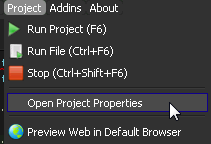
1. In the **Project** menu, select Open Project Properties:
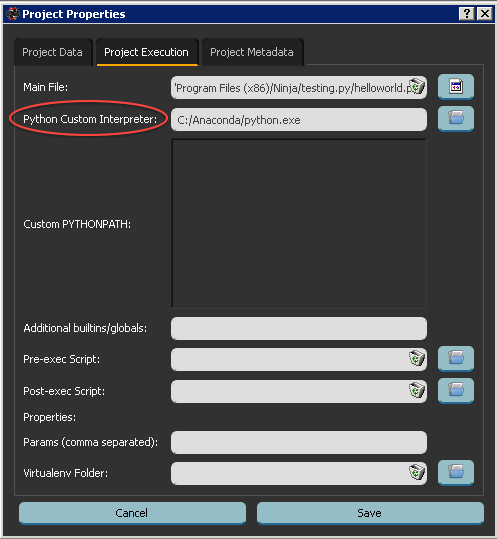
 2. On the **Project Execution** tab, in the Python Custom Interpreter box, enter the [Anaconda Python interpreter path](/docs/getting-started/working-with-conda/ides/python-path) to select Anaconda Python:
 3. Verify the setup with a test script:
To create the test script, enter this code:
```sh theme={null}
import sys
print(sys.version)
```
4. Run your test script.
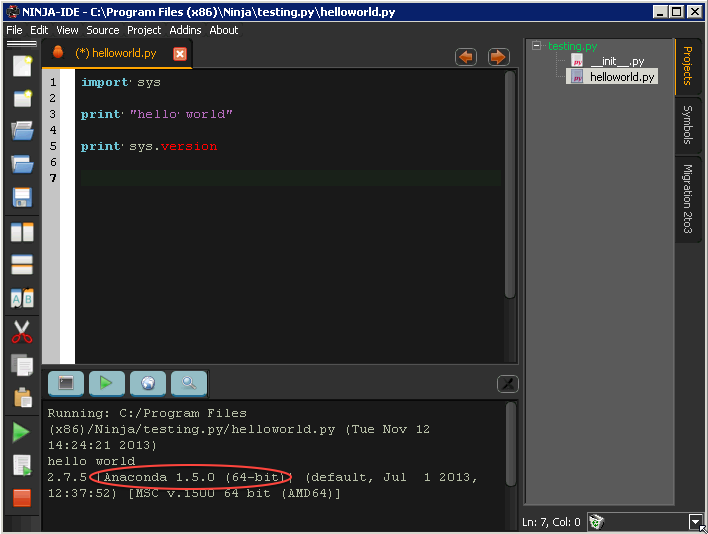
In the command output, your Anaconda Python version is listed:
3. Verify the setup with a test script:
To create the test script, enter this code:
```sh theme={null}
import sys
print(sys.version)
```
4. Run your test script.
In the command output, your Anaconda Python version is listed:
 For more information, see
the [Ninja-IDE documentation](https://ninja-ide.readthedocs.org/en/latest/).
For more information, see
the [Ninja-IDE documentation](https://ninja-ide.readthedocs.org/en/latest/).