> ## Documentation Index
> Fetch the complete documentation index at: https://anaconda.com/docs/llms.txt
> Use this file to discover all available pages before exploring further.
# Migrating projects between version control repositories
If your organization has changed Git hosting services, and you therefore
need to migrate projects from one *supported* version control
repository to another, Anaconda recommends you follow this high-level
process:
1. [Perform pre-migration setup](#pre-migration-setup).
2. [Run the project migration script](#using-the-migration-tool).
3. [Perform post migration cleanup](#post-migration-cleanup).
4. [Adding collaborators](#adding-collaborators).
**Prerequisites:**
* [Update the Data Science & AI Workbench config map](./config-repo) with the information required to connect to the external version control repository.
* To run the project migration script, you’ll need Administrator access to a command line tool that can run bash or Python scripts *on the master node of the Workbench cluster*.
* Ensure a recent version of `git` is installed on the master node\* You’ll also need the origin Git host token/password, and destination Git host token/password.
## Pre-migration setup
1. If you haven’t already done so, *on the master node*, change to the
directory of the unpacked Workbench installer and install
the bootstrap conda environment:
```sh theme={null}
bash conda-bootstrap.sh
```
2. After the environment is finished installing, you might need to log
out and log back in to activate the conda environment.
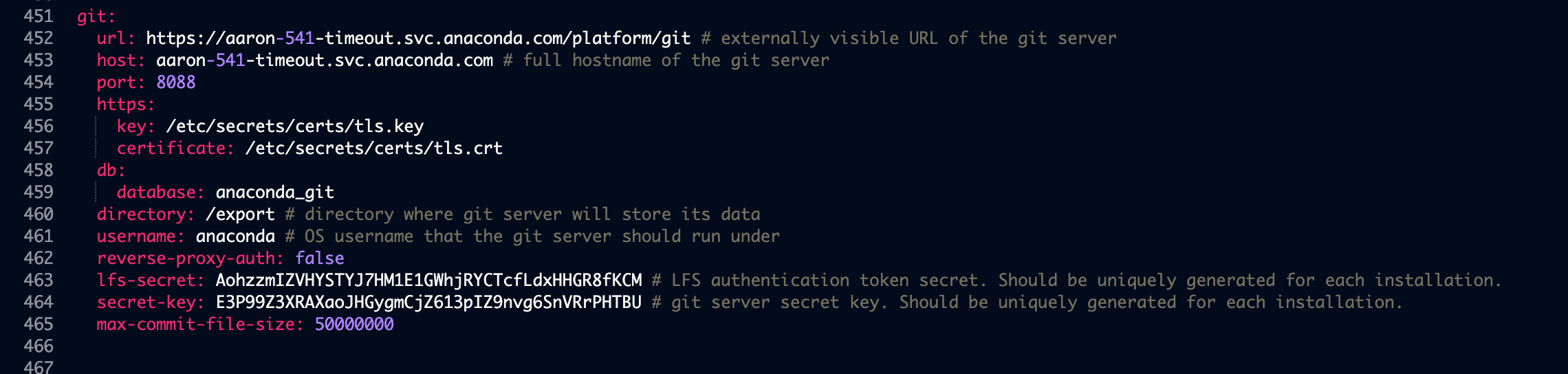
3. Temporarily disable reverse proxy authentication by adding the following
key-value pair to the `git` section (outside of the `storage` section
in the config map) of the `anaconda-enterprise-anaconda-platform.yml`
file used to [configure the platform to use an external version
control repository](./config-repo):
```sh theme={null}
reverse-proxy-auth: false
```
This should look similar to the following:
 4. Run the following command to restart the associated pod on the master node:
```sh theme={null}
kubectl delete pod -l 'app=ap-git-storage'
```
5. Create a user mappings file that maps Workbench user IDs to Git user
IDs. This is a colon-separated text file where the first field is the Workbench user
name, and the second field is the corresponding Git user name. For example:
```
ae-admin:git-admin
ae-user1:git-user1
ae-user2:git-user2
```
If you intend on migrating to or from a Bitbucket repository, you must use your `Bitbucket account ID` instead of your `Bitbucket username` in the `user mappings file`.
## Using the migration tool
Using the migration tool with `https` instead of `http` for the internal storage may result in an SSL error.
The migration tool is a Python script, `migrate_projects.py`, found in the Workbench installation tarball. It can be used in the following ways:
```log theme={null}
usage: migrate_projects.py [-h] [--parallel PARALLEL] [--log-file LOG_FILE]
[--force-migrate] [--scratch-dir SCRATCH_DIR]
--postgres-host POSTGRES_HOST
[--postgres-user POSTGRES_USER]
[--postgres-passwd POSTGRES_PASSWD]
[--origin-api-type {internal,bitbucket-v1-api,bitbucket-v2-api,github-v3-api,gitlab-v4-api}]
--origin-api-url ORIGIN_API_URL
[--origin-username ORIGIN_USERNAME]
[--origin-token ORIGIN_TOKEN]
[--origin-organization ORIGIN_ORGANIZATION]
[--dest-api-type {internal,bitbucket-v1-api,bitbucket-v2-api,github-v3-api,gitlab-v4-api}]
--dest-api-url DEST_API_URL
[--dest-username DEST_USERNAME]
[--dest-token DEST_TOKEN]
[--dest-organization DEST_ORGANIZATION]
--dest-user-mappings DEST_USER_MAPPINGS
optional arguments:
-h, --help show this help message and exit
--cloud Set if using Gitlab Cloud, or older version of Gitlab On-Prem
--parallel PARALLEL Number of parallel migration jobs to spawn
--log-file LOG_FILE Path prefix to log directory, suffixed with a
timestamp, e.g. migrate-projects-
log-1559234750640867208
--force-migrate Forces migration by replacing local and destination
repositories
--scratch-dir SCRATCH_DIR
The scratch directory for cloning project repositories
--postgres-host POSTGRES_HOST
Hostname of Workbench Postgres DB
--postgres-user POSTGRES_USER
Username of Workbench postgres DB
--postgres-passwd POSTGRES_PASSWD
Password of Workbench postgres DB
--origin-api-type {internal,bitbucket-v1-api,bitbucket-v2-api,github-v3-api,gitlab-v4-api}
Origin git host API type
--origin-api-url ORIGIN_API_URL
Origin git host API URL (must be all lowercase)
--origin-username ORIGIN_USERNAME
Origin git host username
--origin-token ORIGIN_TOKEN
Origin git host auth token
--origin-organization ORIGIN_ORGANIZATION
Origin git host organization
--dest-api-type {internal,bitbucket-v1-api,bitbucket-v2-api,github-v3-api,gitlab-v4-api}
Destination git host API type
--dest-api-url DEST_API_URL
Destination git host API URL (must be all lowercase)
--dest-username DEST_USERNAME
Destination git host username
--dest-token DEST_TOKEN
Destination git host auth token
--dest-organization DEST_ORGANIZATION
Destination git host organization
--dest-user-mappings DEST_USER_MAPPINGS
Colon-separated Workbench-to-git-host mappings file, e.g. ae-
user1:github-user1
```
For example, the tool can be used in the following way:
```sh theme={null}
python migrate_projects.py \
--postgres-host localhost --origin-api-url http://localhost:8443/ \
--origin-username root --dest-api-type gitlab-v4-api \
--dest-api-url https://mbrock-gitlab.anacondaenterprise.com/ \
--dest-username root --dest-organization demo --dest-user-mappings \
user-mappings-gitea-to-gitlab.txt --force-migrate --parallel 4
```
To ensure tokens are not visible in bash history, they can be omitted and can be entered via stdin when running the script.
The postgres password can be left blank. When migrating *from* Workbench, the `origin-token` can be left blank. When migrating *to* Workbench, the `dest-token` can be left blank.
When migrating to Gitlab Cloud, please use the `--cloud` flag.
## Post-migration cleanup
After the script finishes migrating the projects, re-enable reverse proxy
authentication by editing the key-value pair you previously added to the
`git` section of the `anaconda-enterprise-anaconda-platform.yml` file,
so it looks like the following:
```
reverse-proxy-auth: true
```
If you do not re-enable reverse proxy authentication, Workbench will not work.
To verify that the new repository is being used by Workbench, [edit an existing project](/docs/data-science/latest/data-science-workflows/projects/project-session) and [commit your changes to it](/docs/data-science/latest/data-science-workflows/projects/collaborate#committing-and-pushing-changes).
### Adding collaborators
If you’ve migrated to [github](https://github.com), whenever a user is [added to a project as a collaborator](/docs/data-science/latest/data-science-workflows/projects/collaborate), they’ll be sent an invitation to collaborate via email. **They’ll need to accept this invitation to be able to commit changes to the repository associated with the project.** *This does not apply to Github Enterprise.*
4. Run the following command to restart the associated pod on the master node:
```sh theme={null}
kubectl delete pod -l 'app=ap-git-storage'
```
5. Create a user mappings file that maps Workbench user IDs to Git user
IDs. This is a colon-separated text file where the first field is the Workbench user
name, and the second field is the corresponding Git user name. For example:
```
ae-admin:git-admin
ae-user1:git-user1
ae-user2:git-user2
```
If you intend on migrating to or from a Bitbucket repository, you must use your `Bitbucket account ID` instead of your `Bitbucket username` in the `user mappings file`.
## Using the migration tool
Using the migration tool with `https` instead of `http` for the internal storage may result in an SSL error.
The migration tool is a Python script, `migrate_projects.py`, found in the Workbench installation tarball. It can be used in the following ways:
```log theme={null}
usage: migrate_projects.py [-h] [--parallel PARALLEL] [--log-file LOG_FILE]
[--force-migrate] [--scratch-dir SCRATCH_DIR]
--postgres-host POSTGRES_HOST
[--postgres-user POSTGRES_USER]
[--postgres-passwd POSTGRES_PASSWD]
[--origin-api-type {internal,bitbucket-v1-api,bitbucket-v2-api,github-v3-api,gitlab-v4-api}]
--origin-api-url ORIGIN_API_URL
[--origin-username ORIGIN_USERNAME]
[--origin-token ORIGIN_TOKEN]
[--origin-organization ORIGIN_ORGANIZATION]
[--dest-api-type {internal,bitbucket-v1-api,bitbucket-v2-api,github-v3-api,gitlab-v4-api}]
--dest-api-url DEST_API_URL
[--dest-username DEST_USERNAME]
[--dest-token DEST_TOKEN]
[--dest-organization DEST_ORGANIZATION]
--dest-user-mappings DEST_USER_MAPPINGS
optional arguments:
-h, --help show this help message and exit
--cloud Set if using Gitlab Cloud, or older version of Gitlab On-Prem
--parallel PARALLEL Number of parallel migration jobs to spawn
--log-file LOG_FILE Path prefix to log directory, suffixed with a
timestamp, e.g. migrate-projects-
log-1559234750640867208
--force-migrate Forces migration by replacing local and destination
repositories
--scratch-dir SCRATCH_DIR
The scratch directory for cloning project repositories
--postgres-host POSTGRES_HOST
Hostname of Workbench Postgres DB
--postgres-user POSTGRES_USER
Username of Workbench postgres DB
--postgres-passwd POSTGRES_PASSWD
Password of Workbench postgres DB
--origin-api-type {internal,bitbucket-v1-api,bitbucket-v2-api,github-v3-api,gitlab-v4-api}
Origin git host API type
--origin-api-url ORIGIN_API_URL
Origin git host API URL (must be all lowercase)
--origin-username ORIGIN_USERNAME
Origin git host username
--origin-token ORIGIN_TOKEN
Origin git host auth token
--origin-organization ORIGIN_ORGANIZATION
Origin git host organization
--dest-api-type {internal,bitbucket-v1-api,bitbucket-v2-api,github-v3-api,gitlab-v4-api}
Destination git host API type
--dest-api-url DEST_API_URL
Destination git host API URL (must be all lowercase)
--dest-username DEST_USERNAME
Destination git host username
--dest-token DEST_TOKEN
Destination git host auth token
--dest-organization DEST_ORGANIZATION
Destination git host organization
--dest-user-mappings DEST_USER_MAPPINGS
Colon-separated Workbench-to-git-host mappings file, e.g. ae-
user1:github-user1
```
For example, the tool can be used in the following way:
```sh theme={null}
python migrate_projects.py \
--postgres-host localhost --origin-api-url http://localhost:8443/ \
--origin-username root --dest-api-type gitlab-v4-api \
--dest-api-url https://mbrock-gitlab.anacondaenterprise.com/ \
--dest-username root --dest-organization demo --dest-user-mappings \
user-mappings-gitea-to-gitlab.txt --force-migrate --parallel 4
```
To ensure tokens are not visible in bash history, they can be omitted and can be entered via stdin when running the script.
The postgres password can be left blank. When migrating *from* Workbench, the `origin-token` can be left blank. When migrating *to* Workbench, the `dest-token` can be left blank.
When migrating to Gitlab Cloud, please use the `--cloud` flag.
## Post-migration cleanup
After the script finishes migrating the projects, re-enable reverse proxy
authentication by editing the key-value pair you previously added to the
`git` section of the `anaconda-enterprise-anaconda-platform.yml` file,
so it looks like the following:
```
reverse-proxy-auth: true
```
If you do not re-enable reverse proxy authentication, Workbench will not work.
To verify that the new repository is being used by Workbench, [edit an existing project](/docs/data-science/latest/data-science-workflows/projects/project-session) and [commit your changes to it](/docs/data-science/latest/data-science-workflows/projects/collaborate#committing-and-pushing-changes).
### Adding collaborators
If you’ve migrated to [github](https://github.com), whenever a user is [added to a project as a collaborator](/docs/data-science/latest/data-science-workflows/projects/collaborate), they’ll be sent an invitation to collaborate via email. **They’ll need to accept this invitation to be able to commit changes to the repository associated with the project.** *This does not apply to Github Enterprise.*